|
|

|
|
|
|
|
 |
|
|
|||||||||||||||||||||||
 |
|||||||||||||||||||||||
|
|||||||||||||||||||||||
|
|
|||||||||||||||||||||||
|
Discovery Theme Features |
|||||||||||||||||||||||
|
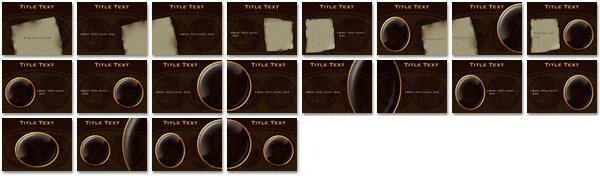
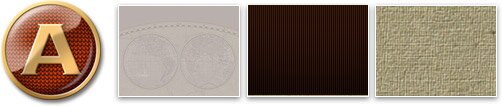
Take your audience on a successful voyage with "Discovery". Featuring 20 photo cutout Masters in two styles. One is a porthole with hi-lights and shadows that suggest a glass lens. The other resembles aged canvas that creates distressed stained edges on any photo placement. In addition, three sets of Keynote Theme Parks original "bleed" photo cutouts that match up across two slides when using a Push or Cube transition are included. Charts (with custom canvas fills) and Tables are sized according to Master, plus custom bullet. Extras for this theme are original drop caps with a blank version, three complimentary backgrounds and six color chips. |
|||||||||||||||||||||||
| A | |||||||||||||||||||||||
 |
(2.2 MB) | ||||||||||||||||||||||
| A | |||||||||||||||||||||||
| Photo Cutouts | |||||||||||||||||||||||
 |
|||||||||||||||||||||||
|
.
|
|||||||||||||||||||||||
| Extras | |||||||||||||||||||||||
 |
|||||||||||||||||||||||
| Important Note: This theme utilizes transparent shading within the photo cutouts, but around the edge. Once an image is sent "back" and you want to select and manipulate it, it is important to remember to select the image using the completely clear center area of the cutout. | |||||||||||||||||||||||
|
|
|||||||||||||||||||||||
|
When it comes to truly innovative themes, Keynote Theme Park delivers the goods. Introducing: |
|||||||||||||||||||||||
 |
|||||||||||||||||||||||
|
The first theme with an animated background!
|
|||||||||||||||||||||||
| Global Theme Features | |||||||||||||||||||||||
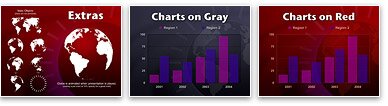
| Ideal for presentations on any topic with a Global aspect such as economic, financial or environmental. Three themes are included; Global has North and South America and parts of Europe in the background, Global Asia shows Asia and Global Animated has a rotating animated globe. If the continents are too strong or too subtle, just edit the opacity in the Master Slides to your liking. This threesome features four sets of special bleed cutouts for dynamic use with Keynotes Cube and Push transitions (see movie). All charts and tables have been sized for each photo cutout, in addition charts have been customized for the blue-gray complimentary background. Global incorporates another first in theme making: translucent chart backgrounds. Extras include an animated globe, a number of still globe views, a design element (circle of tick marks), one complimentary background and 12 photo cutouts. | |||||||||||||||||||||||
| A | |||||||||||||||||||||||
|
(2 MB) | ||||||||||||||||||||||
| . | |||||||||||||||||||||||
| Photo Cutouts | |||||||||||||||||||||||
 |
|||||||||||||||||||||||
| . | |||||||||||||||||||||||
| Extras | |||||||||||||||||||||||
|
|||||||||||||||||||||||
|
Special Note: You may combine Master Slides from all three Themes! Size the Extras globe animation (with 15% opacity) to overlay a pie chart for a great effect. Don't forget to save your presentation with "copy movies into document" if you are going to transfer your presentation to other computers. |
|||||||||||||||||||||||
|
|
|||||||||||||||||||||||
| Woodcut Theme Features | |||||||||||||||||||||||
| Craftsmanship comes to mind when taking a close look at "Woodcut". From the beautiful blond grain, to the wide polished bevel on the 13 photo cutouts (including two bleed sets for dynamic transitions), to the inlaid grid lines on the charts, this theme displays the traditions of a Master Carpenter. Charts and tables are sized per photo cutout master and contain translucent backgrounds to let the wood grain show through. Charts have been customized for the complimentary dark background (included for those times you want something different but is still a match with the theme). Woodcut comes with three bullet levels and transparent colored wood stain for chart fills. Nine hand carved finials can be used alone or in combination to construct intricate additions. Two routered "lines" and an oversized bullet are included in the Extras file. Finally, we have an inlaid Japanese character meaning "East' and instructions on how to construct your own inlaid element or logo. | |||||||||||||||||||||||
| A | |||||||||||||||||||||||
|
(3.3 MB) | ||||||||||||||||||||||
| . | |||||||||||||||||||||||
| Photo Cutouts | |||||||||||||||||||||||
 |
|||||||||||||||||||||||
| . | |||||||||||||||||||||||
| Extras | |||||||||||||||||||||||
 |
|||||||||||||||||||||||
|
|
|||||||||||||||||||||||

|
|||||||||||||||||||||||
 |
|||||||||||||||||||||||